AI-native IDE v0.9 beta

One codebase. Deep context on
the systems it talks to.
One agentic loop.

Potion ingests documentation, specs, and schemas for the infrastructure, APIs, and protocols your project depends on — then gives your AI agent the full picture to act with confidence.
Kubernetes CRDs OpenAPI specs gRPC / Protobuf Internal wikis DB schemas Terraform modules + any source
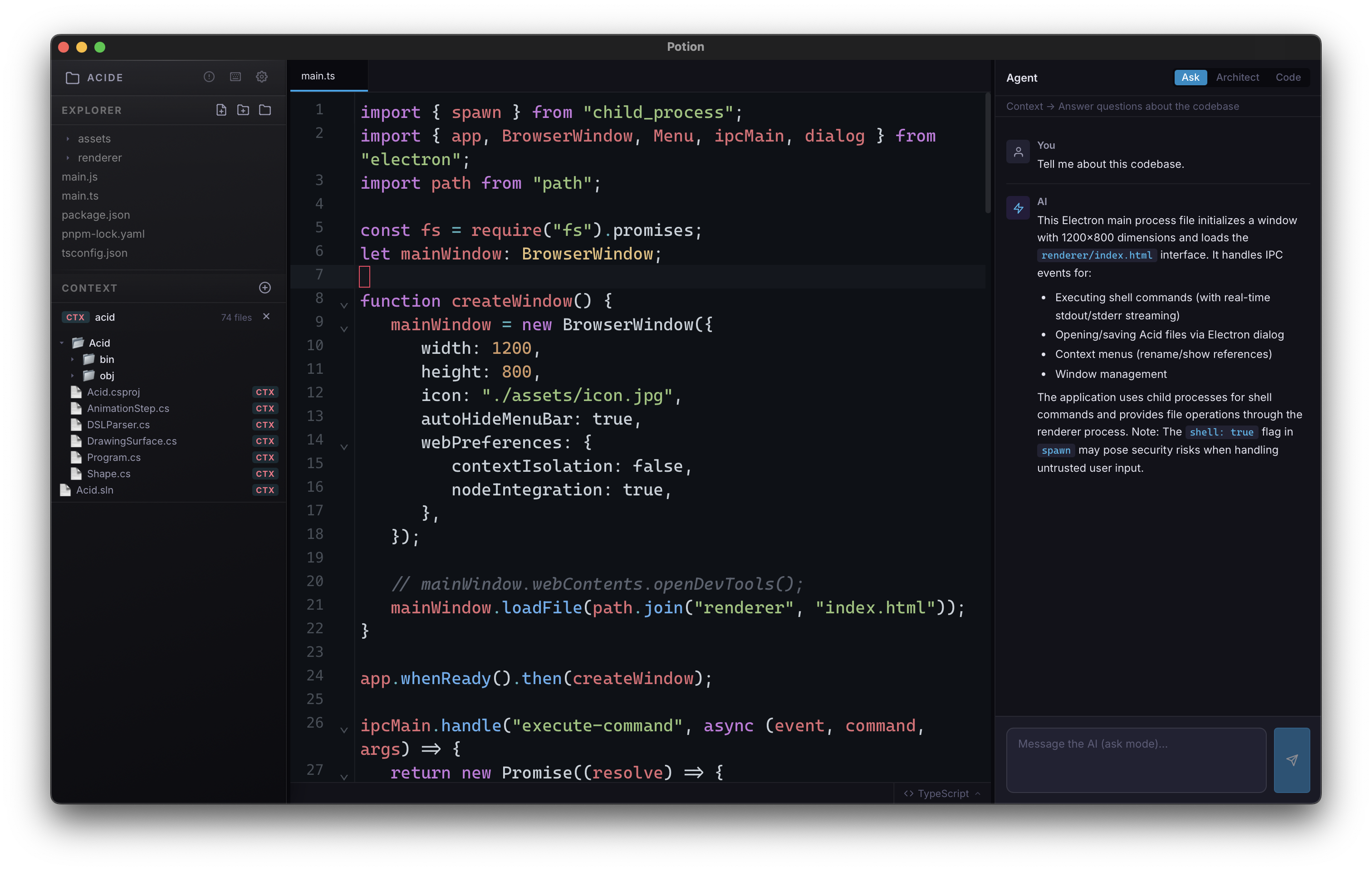
Potion IDE screenshot
01
Dedicated context menu
Load external system knowledge — specs, schemas, runbooks — directly into the model's working context. Not as chat attachments. As first-class project data.
02
Massive context window
Potion is built around models with long context from the ground up. Your full codebase and your system docs fit simultaneously — no chunking, no retrieval roulette.
03
Agentic execution
The agent understands what your code is integrating with. It reads, edits, runs tests, and iterates — grounded in real integration knowledge, not hallucinated interfaces.
How it works

Context first. Then code.

Most AI IDEs treat your codebase as the only source of truth. Potion adds a layer: structured knowledge about the external systems your code actually integrates with.

STEP 01

Open the Context Menu

A dedicated panel in the IDE lets you define the external systems relevant to your project. Point Potion at OpenAPI docs, Protobuf definitions, Terraform provider schemas, internal runbooks — any authoritative source.

+ Add context source
→ OpenAPI spec (URL or file)
→ Protobuf schema
→ Markdown / wiki page
→ DB schema (SQL DDL)
STEP 02

Potion loads it into context

Your system docs are processed and loaded alongside your codebase into a massive context window — not as background embeddings, but as real, readable content the model can reason over directly.

context window 1.2M tokens
codebase
system context
conversation
STEP 03

Issue an agentic task

Describe what you want built or fixed. The agent plans steps, writes code, runs tests, and iterates — leveraging full knowledge of both your code and the external systems it touches.

Implement the new /checkout endpoint using the payment provider's v3 API and add integration tests

Reading PaymentAPI v3 spec…
Analyzing existing routes…
Writing handler + tests…
Done. 3 files changed.
STEP 04

Review and ship

Changes are diffed inline. Accept, reject, or refine. The agent explains its decisions by citing the actual spec it used — so you know exactly why it chose a particular field, endpoint, or schema.

- const res = await oldPayClient.charge(amount)
+ const res = await paymentV3.createIntent({
+ amount, currency: 'gbp',
+ confirm: true
+ })
↳ per PaymentAPI v3 spec §4.2 — createIntent replaces charge()

Context engine

The systems your code integrates with are rarely documented inside your repo.

Kubernetes operators, internal platform APIs, payment gateways, observability stacks — the ground truth lives elsewhere. Potion is built around the reality that production codebases are always entangled with external systems.

The context menu is a structured, persistent way to bring that knowledge into the IDE — versioned per project, sharable with your team, and always present in the agent's window when it matters.

Load any spec format: OpenAPI, Protobuf, AsyncAPI, GraphQL SDL, SQL DDL, Markdown
Context sources are pinned to projects — load once, available every session
Control what's active per task — enable or disable sources without removing them
Export and share context configurations across your team
Context Sources + Add source
payment-api-v3.yaml
OpenAPI 3.1 · 84 endpoints
active
platform.proto
Protobuf 3 · 12 services
active
k8s-operator-crds.md
Markdown · internal wiki
active
legacy-db-schema.sql
SQL DDL · 42 tables
paused
3 sources active ~340k tokens

Capabilities

Built for integration-heavy work

Full codebase awareness

Potion holds your entire repo in context — not a sliding window or sparse index. The agent navigates your project the same way a senior engineer would.

Agentic edit loops

The agent writes code, runs tests, reads errors, and iterates — autonomously completing multi-step tasks without you shepherding each move.

Cited reasoning

When the agent makes a decision based on an external spec, it tells you which section it referenced. Auditable by design.

Team context sharing

Context configurations are exportable. Define the system sources once for a project, share the config file, and every engineer on the team starts from the same knowledge base.

Versioned context

Pin your context sources to specific versions or commits. When an external API updates, you decide when to bump — no silent context drift.

Local-first, private

Your codebase and your context sources stay on your machine. Potion sends only what's necessary to the inference API, nothing more.


Potion IDE

Ready to give your agent
the full picture?

Available now for macOS. Linux and Windows builds in progress.

macOS 13+ · Apple Silicon & Intel